
Guides
Best Alarm App for iPhone in 2026: 7 Picks, Each for a Different Job
Quick answer
The best alarm app for iPhone depends on the job. Clock is the best free pick, Alarmy has the most missions and sleep tools, SuperAlarm adds a lifetime option, Sleep Cycle wakes you gently, Tagdawn is a pay-once NFC alarm, Wayk pairs missions with streaks, and Daylino (coming soon) asks for a photo away from bed, then a second snap when your morning goal starts.
TL;DR: The best alarm app for iPhone depends on what you need it to do. For free and simple, use Apple's Clock. For the most wake-up missions and sleep tools, Alarmy. For a gentle wake-up, Sleep Cycle. To pay once, Tagdawn with an NFC tag. Daylino, the alarm we make, stops with a photo away from bed and asks for a second snap when your morning goal starts. It's coming soon to the App Store.
"Best" means something different to someone who needs a prettier sound, someone who snoozes for an hour, and someone who wants their phone to track their sleep. So instead of one winner, this list gives each app the job it does best, the price its App Store listing shows today, and one drawback you should know before you download.
Compare the 7 at a glance (Prices checked 11 Nov 2026, US App Store)
| App | Best for | Price as listed | Needs | Main drawback |
|---|---|---|---|---|
| Clock | Free and simple | Free, built in | Any iPhone | Stop is one tap from bed |
| Alarmy | Most missions plus sleep tools | Free; in-app purchases $4.99 to $69.99 | iOS 17 or later | Key extras are Premium |
| SuperAlarm | Missions with a lifetime option | Free; Monthly $9.99; Lifetime Membership $34.99 and $69.99 | iOS 17 or later | Label lists data used to track you |
| Sleep Cycle | Gentle wake-up, sleep tracking | Free; Premium $1.99 to $69.99 | iOS 16.2 or later | Doesn't get you out of bed |
| Tagdawn | Pay once, tap an NFC tag | $9.99, no in-app purchases | iOS 26 or later, an NFC tag | Stop works like a snooze |
| Wayk | Missions and streaks | Free download; Weekly $6.99, Monthly $9.99, Yearly $19.99 to $59.99 | iOS 17 or later | Subscription required to set alarms |
| Daylino | Off switch away from bed, then your goal | Coming soon; no free version | iOS 26 or later | Not out yet |
Listings show up to ten in-app purchases and the price you see in the app may be one of several, so check it before a trial.
What makes an alarm app worth it on iPhone
- It rings when it should. Apple says Clock alarms sound even with Silent mode, Do Not Disturb or another Focus on (Apple). Newer apps built on Apple's alarm system say the same on their listings.
- How you stop it. One tap, a puzzle you can solve lying down, or something that makes you walk.
- What it costs, and how. Free, one price, or a subscription.
- Its privacy label. Every listing shows what data the app says it collects, and what it says is used to track you.
The 7 best alarm apps for iPhone, by job
1. Best free and simple: Apple Clock
Clock is free and already on your iPhone. Each alarm can repeat on chosen days, carry a label, play a ringtone or a song, and have Snooze on or off with its own snooze duration (Apple). Its privacy label lists only data not linked to you.
Drawback: Stop is one tap, and nothing checks you're up. Pick it if you only need a reliable sound. Our guides to changing the alarm sound and stopping the snooze habit help you get more from it.
2. Best for many missions plus sleep tools: Alarmy
Alarmy lists wake-up missions (math, memory games, shaking, squats, a Photo Mission), Anti-Snooze, a snore and sleep tracker, sleep sounds and bedtime alarms. The listing says the alarm clock, sleep tracker and sleep sounds are free, with a 7-day free trial of Premium; in-app purchases run from $4.99 to $69.99. It needs iOS 17 or later.
Drawback: the extras heavy sleepers want are Premium. Alarmy's help center says that when Premium ends, Wake Up Check and the Sound Power Pack turn off (Alarmy help). Its label also lists location, identifiers and usage data as used to track you. See is Alarmy free and our Alarmy alternative guide.
3. Best Alarmy-style app with a lifetime option: SuperAlarm
SuperAlarm lists six missions: math problems, memory games, barcode scanning, object scanning, Face ID and walking, plus a Wake up check and an Apple Watch app. Its listed purchases include weekly ($4.49 and $4.99), monthly ($9.99) and yearly ($29.99 to $49.99) subscriptions, and a Lifetime Membership at $34.99 and $69.99.
Drawback: like Alarmy, its label lists location, identifiers and usage data as used to track you, and with this many price points the offer you see may differ from someone else's. Pick it if you like the Alarmy idea but would rather pay once.
4. Best for a gentle wake-up and sleep tracking: Sleep Cycle
Sleep Cycle tracks your sleep by sound or motion, and its Smart Alarm, per the listing, wakes you during your lightest sleep phase. It adds snore detection, sleep sounds and an AI sleep coach. Free to download; Premium purchases are listed from $1.99 to $69.99.
Drawback: it's built to wake you gently, not to get you up, so nothing stops you switching it off in bed. For that problem, see alarm apps that make you get out of bed.
5. Best pay-once alarm you tap off: Tagdawn
Tagdawn turns any NFC sticker into the off switch. Put a tag across the room, then scan it to turn the alarm off. It costs $9.99 on the US App Store with no in-app purchases, its label says no data collected, and it rings through Silent mode and Focus. You can lock alarm edits behind Face ID and keep a printable QR backup.
Drawback: iPhone always shows Stop, and on a tag alarm Tagdawn treats Stop as a snooze, ringing again after the wait you choose. Its listing also says the side or volume buttons can quiet a ring without Tagdawn knowing. You need tags and iOS 26 or later. For a free tag alarm, Opto Wake has no in-app purchases. More in our NFC alarm clock guide.
6. Best for missions with streaks: Wayk
Wayk stops only when you finish a mission you chose before bed: pushups, a photo of the sky, making your bed, finding a random object, reading a Bible verse or an affirmation aloud. It tracks streaks and morning insights.
Drawback: after the setup questions, its listing says an active Wayk Pro subscription is required to set alarms and use missions (Weekly Access $6.99, Monthly Access $9.99, Yearly Access $19.99 to $59.99). Its label lists purchases, identifiers and usage data as used to track you. Full review: Wayk app. If streaks are the draw, compare the Erly app.
7. Best for the off switch away from bed, then a start to your goal: Daylino (coming soon)
We make Daylino, so weigh this entry with that in mind. Daylino is an iPhone alarm with no snooze button that rings through silent mode and Focus. You turn it off with a fresh photo of the spot you chose away from bed: the bathroom sink, your toothbrush, the kettle or coffee machine, a glass of water, the inside of the fridge, or your made bed. Stop it another way and it rings again a minute later, for up to 15 minutes.
Then comes the part most alarms skip. A second snap records that your morning goal has started: an open book, shoes on, a mat rolled out. You can snap it now or tap Later; it waits up to 2 hours, with one reminder. Rest days never count against you, and there's no account.
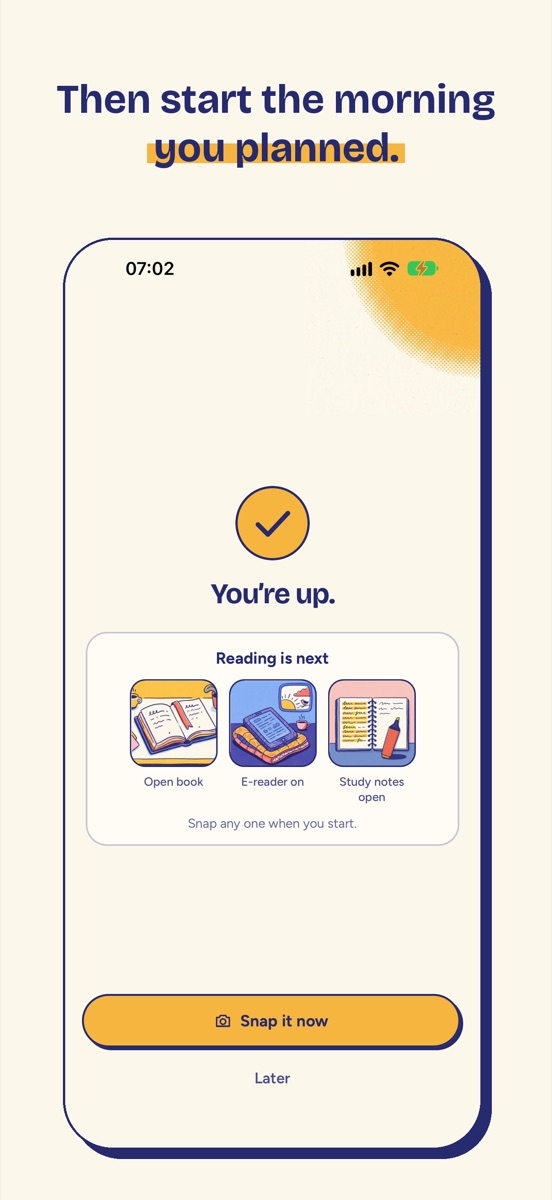
Drawbacks: it isn't out yet, it needs iOS 26 or later, and there is no free version. The check recognizes the object, not where it is, so the distance from bed is up to you. Pick something else if you need an alarm today, want a free app, or don't want a second step after waking. See how Daylino works and our guide to the alarm that makes you take a picture.
How we compared
We read each app's own App Store listing (US) and website on 11 Nov 2026, plus Apple's and Alarmy's support pages, and quote features and prices from them. We did not install or test competitor apps, and we don't use star ratings. Daylino's facts come from our own product documents.
How to choose in 30 seconds
- You just need it to ring: Clock.
- You want variety and sleep tools: Alarmy, or SuperAlarm to pay once.
- You wake up groggy: Sleep Cycle.
- You turn alarms off in bed: Tagdawn or Opto Wake with a tag, or Daylino when it's out. Heavy sleeper? See our heavy sleepers list.
- You like streaks: Wayk.
- You get up but never start what you planned: Daylino.
FAQ
What is the best alarm app for iPhone?
There isn't one winner. Clock is the best free choice, Alarmy has the most missions and sleep tools, Sleep Cycle is best for a gentle wake-up, and Tagdawn is a strong pay-once alarm. Daylino, coming soon, is for people who want to get up and start a planned goal.
Is the built-in Clock app good enough?
For many people, yes. It's free, rings through Silent mode and Focus, and lets you turn snooze off per alarm. It just can't make you leave the bed.
Is there a free alarm app that makes you get up?
Yes. Opto Wake is free with no in-app purchases and stops when you tap an NFC tag. Alarmageddon is free with no in-app purchases and offers math, memory, shake, QR code and barcode challenges. Both need iOS 26 or later (Opto Wake 26.1).
Is Daylino free?
No. There is no free version. Daylino is coming soon to the App Store for iPhone with iOS 26 or later; follow along at daylino.resonancestudio.ai.
Pick by your morning
The best alarm app for iPhone is the one that fixes your mornings: a better sound, a reason to walk, a gentler wake-up, or a way into the thing you planned. If that last one is you, see how Daylino works. It's coming soon to the App Store.