
Guides
NFC Alarm Clock for iPhone (2026): What You Need, and 8 Options Compared
Quick answer
An NFC alarm clock keeps ringing until you get up and tap your iPhone on an NFC sticker you placed away from bed. You need an app that supports it, an NTAG213, 215 or 216 sticker (an on-metal tag for metal surfaces), and a test tap where the tag will live. Here are 7 iPhone tap-to-stop alarms from their own listings, plus Daylino, which uses a photo instead.
TL;DR: An NFC alarm clock is an iPhone alarm that keeps ringing until you get up and tap your phone on an NFC sticker you placed away from bed. You need an app that supports it, a cheap NTAG213, 215 or 216 sticker (an on-metal tag for metal surfaces), and a test tap where the tag lives. Below are 7 iPhone options from their own listings, plus Daylino, the photo alarm we make, which uses no tag.
The idea is simple: the off switch is a sticker on the bathroom mirror or by the kettle, so you can't stop the alarm from under the covers. This guide covers what you need before you buy anything, how the iPhone apps differ on the details that matter at 6 a.m., and which one fits which job.
What an NFC alarm clock is
An NFC alarm clock is an alarm app that only fully stops when your iPhone reads an NFC tag you registered in advance. NFC (near-field communication) is short-range: you hold the top of the iPhone near the sticker and the app confirms it.
It is a close cousin of the barcode alarm clock, which scans a printed code instead. It is different from a math alarm clock or a puzzle alarm clock, which you can finish lying down. OkiPaca's NFC page sums up the case for a tag: it works in the dark, it takes one tap, and "you can't tap a photo of a tag."
What you need for an NFC alarm on iPhone
- An iPhone on the app's minimum iOS. Most of the apps below need iOS 26 or later (Opto Wake 26.1, Lasso 26.2, Tagle 26.4); Munter runs on iOS 16.4. OkiPaca's page says every iPhone that runs iOS 26 has an NFC reader.
- A sticker. Opto Wake and OkiPaca name NTAG213, NTAG215 or NTAG216; Tagle names NTAG213. OkiPaca describes them as thin, cheap and sold in packs, and says you don't need another app to write to the tag first.
- The right surface. OkiPaca's advice: metal blocks most NFC stickers, so use an on-metal tag for a fridge or a metal door.
- A test tap in place. Stick the tag where it will stay, then register and test it there. OkiPaca saves the alarm only after the test tap works; Opto Wake and Tagdawn both have a test alarm.
- A lost-tag escape. Tags fall off. Check what the app does when you can't reach yours (the table below lists each one).
- A plan for the Stop button. iPhone always shows Stop on a ringing alarm, and an app can't remove it (Tagdawn's listing says so plainly). What matters is what happens next: a good NFC alarm rings again until the tag is tapped.
If your alarm doesn't ring at all, start with our guide to an iPhone alarm not going off before blaming the tag.
iPhone NFC alarm apps compared
How we compared: each app is described from its own App Store listing and website, fetched on 11 Nov 2026. We did not install or test these apps. "Not stated" means the listing doesn't say.
| App (Prices checked 11 Nov 2026, US App Store) | Price | Needs | Stop on the Lock Screen | If you can't reach the tag | Privacy label |
|---|---|---|---|---|---|
| Opto Wake | Free, no in-app purchases | iOS 26.1 | Doesn't count; follow-up alarms ring until you tap | Emergency Release, three uses ever | Data Not Collected |
| OkiPaca | Free download; Plus $1.99 weekly, $4.99 monthly, $29.99 yearly, $59.99 lifetime | iOS 26 | Doesn't count; rings again after 30 s, 1, 3 or 5 min | Emergency Hold | Tracking data listed |
| Tagdawn | $9.99 paid app | iOS 26 | Works as a snooze; rings again after your wait | Optional backup QR code | Data Not Collected |
| Tagle Alarm | $4.99 paid app | iOS 26.4 | Not stated | Not stated | Data Not Collected |
| Munter | Free, no in-app purchases | iOS 16.4 | Not stated; limited snoozes, then only the scan | Not stated | Data linked to you |
| Wake NFC Alarm | Free, no in-app purchases | iOS 26 | Not stated | Not stated | Data Not Collected |
| Lasso (hardware) | App free; needs a Lasso device (see their site) or a $11.99 seat | iOS 26.2 | Not stated | Emergency bypass | Data linked to you |
| Daylino (no tag) | Not out yet | iOS 26 | Rings again a minute later, for up to 15 minutes | Snap another spot, or hold 30 seconds | No label yet |
The options, ranked by job
Best free NFC alarm: Opto Wake
Opto Wake has no snooze, rings in Silent mode and through Focus on Apple's AlarmKit, and says stopping from the Lock Screen doesn't count because the follow-up alarms are already set. No account, no analytics, no subscription. Drawback: its Emergency Release works three times, ever (you can also turn it off), so a lost tag after that means the tag is your only way out.
Best if you want more than NFC: OkiPaca
OkiPaca offers NFC alongside QR and barcode scans, an AI object mission, exercise reps and Read Aloud, ten mission types in all, plus an optional Morning Block of distracting apps. Drawback: alarms need OkiPaca Plus, and its label lists purchases, location, identifiers, usage data and diagnostics as used to track you.
Best pay-once with habits and an app blocker: Tagdawn
Tagdawn lets you require several taps or a route of tags through different rooms, locks alarm edits behind Face ID, and includes an app blocker you end with your tag. Its listing is unusually frank about iOS limits. Drawback: on a tag alarm, Stop works as a snooze, and side or volume buttons can quiet a ring without Tagdawn knowing; it then nudges with a vibration every 13 seconds for about 5 minutes.
Cheapest pay-once, NFC only: Tagle Alarm
Tagle Alarm is a one-time purchase with multiple tags, gradual volume, a sleep log and a backup alarm if the main one can't run. Drawback: it needs iOS 26.4 or later, and its listing doesn't say what Stop on the Lock Screen does.
Best for older iPhones: Munter
Munter runs on iOS 16.4 and adds sleep analysis, a wake check after you get up, and a streak with one joker per month for off days. Drawback: it allows a limited number of snoozes before only the scan works, so it isn't snooze-free.
Simplest listing: Wake NFC Alarm
Wake NFC Alarm is free, with no in-app purchases and a "Data Not Collected" label. Drawback: its listing says almost nothing about re-ringing or a lost tag, so you'd be finding out on the morning.
Best if you want a device, not stickers: Lasso
Lasso is a physical device you place away from bed and tap to stop your phone's alarm. Extra household members can pair for a one-time in-app purchase, and an emergency bypass covers travel. Drawback: you have to buy the Lasso device first (price on their site), and the app includes an optional one-time snooze.
No tag at all: Daylino
We make Daylino, and it has no NFC, barcode or QR missions. Instead, the alarm stops when you take a fresh photo of the spot you chose away from your bed: the bathroom sink, your toothbrush, the kettle or coffee machine, a glass of water, the inside of the fridge or your made bed. There's no snooze button, it rings through silent mode and Focus, and if you stop it with the side button it rings again a minute later, for up to 15 minutes. Within two hours, a second snap shows the first minute of your morning goal.
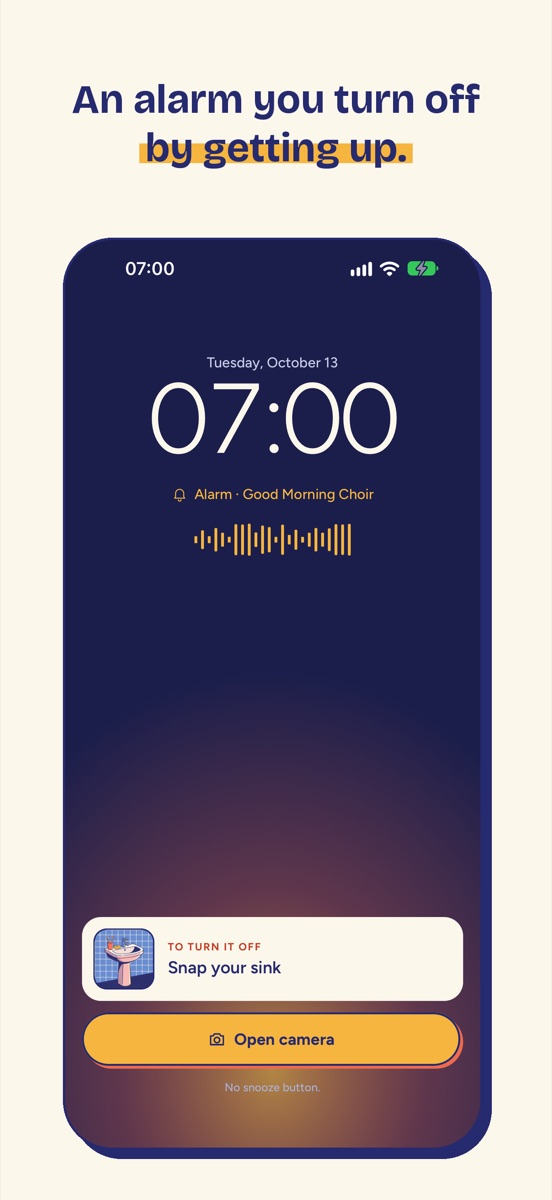
Drawbacks: Daylino is not out yet (it is coming soon to the App Store), it needs iOS 26 or later, and there is no free version. The check recognizes the object in your photo, not where it is, so a tag fixed to a wall is stricter about place: with Daylino, keeping the spot away from bed is up to you. See how Daylino works and our guide to the alarm that makes you take a picture.
Where NFC alarms fall short
- The tag moves. A sticker that falls off, or ends up on the nightstand, turns the alarm back into an ordinary one.
- Stopping the sound isn't starting the day. A tap proves you stood up once. If you tend to tap and go back to bed, look for a follow-up check (Munter's wake check) or a second step (Daylino's start snap).
- The escape hatch is a trade-off. Generous escapes are easy to lean on; strict ones (three uses ever) leave you stuck if a tag fails while you're away.
For alarms that make you leave the bed without any hardware, see alarm apps that make you get out of bed and our best alarm app for heavy sleepers list.
FAQ
Do I need special NFC tags for an NFC alarm clock?
No special brand. Opto Wake and OkiPaca name standard NTAG213, NTAG215 or NTAG216 stickers, and Tagle names NTAG213. Use an on-metal tag for a fridge or metal door.
Which iPhones can read NFC tags?
OkiPaca's page says every iPhone that runs iOS 26 has an NFC reader. Each app also lists its own minimum iOS, from 16.4 (Munter) to 26.4 (Tagle).
Does an NFC alarm ring on silent?
The apps that use Apple's own alarm system say yes: Opto Wake, OkiPaca and Tagdawn all say their alarms ring in Silent mode and through Focus.
What if I lose the tag?
It depends on the app: Opto Wake gives three emergency releases ever, OkiPaca has Emergency Hold, Tagdawn offers a backup QR code, and Lasso has an emergency bypass. Register a spare tag if the app allows more than one.
Is an NFC alarm better than a barcode alarm?
NFC works in the dark and can't be fooled by a photo of the code. Barcode alarms can use codes you already own, like a toothpaste box. See our barcode alarm clock guide.
The short version
An NFC alarm clock works if the tag stays put somewhere you have to walk to and the app keeps ringing after Stop. Opto Wake is the free pick, OkiPaca the broadest, Tagdawn and Tagle the pay-once picks, Munter the one for older iPhones, and Lasso the device. If you'd rather not manage tags at all and want the alarm to lead into your morning goal, take a look at Daylino, coming soon to the App Store.