
Guides
Wayk App Review (2026): Missions, Price, and Alternatives
Quick answer
The Wayk app is an iPhone mission alarm: it keeps ringing until you finish a task like pushups, a photo of the sky or making your bed. It is free to download, but its App Store page says a Wayk Pro subscription is required to set alarms, with plans listed from $6.99 weekly to $59.99 yearly (checked 11 Nov 2026).

TL;DR: The Wayk app is an iPhone alarm that keeps ringing until you finish a mission, like pushups, a photo of the sky or making your bed, and it tracks your streak. It is free to download, but its App Store page says a Wayk Pro subscription is required to set alarms. Plans are listed from $6.99 weekly to $59.99 yearly (checked 11 Nov 2026). Alternatives below include Daylino, the photo alarm we make, coming soon.
This review covers what Wayk does, what it costs, what its privacy label says, and who should pick something else. Everything about Wayk comes from its own App Store page and website, both opened on 11 Nov 2026.
What is the Wayk app?
Wayk is an alarm app from Dialed Labs Inc. Its App Store page calls it "an alarm clock built to help you actually get out of bed": instead of snooze, you wake up with a mission you must complete before the alarm turns off. The page describes three steps:
- Choose a mission before bed.
- When the alarm rings, complete the task.
- The alarm only stops when the mission is done.
The listed mission examples are doing pushups, taking a photo of the sky, making your bed, finding a random object, reading a Bible verse, and reading an affirmation aloud. Wayk also tracks streaks and morning insights and lets you set unlimited alarms.
The listing says Wayk needs iOS 17 or later on iPhone (it is also listed for Apple silicon Macs and Apple Vision). It sits in Health & Fitness with a 13+ age rating, and version 1.0.2.037 came out on 10 Nov 2026. Wayk's website walks through five steps (set your alarm, pick a mission, the alarm rings, complete the mission, track your streak) and says "No traditional snooze, just your mission awaits." The site also links to Google Play; this review covers the iPhone app only.
How Wayk works in the morning
The missions fall into three rough groups, going by their names on the listing:
- Move: pushups and making your bed get your body going.
- Go somewhere: a sky photo sends you to a window or outside, and finding a random object sends you around your home.
- Words: a Bible verse or an affirmation read aloud.
The moving and go-somewhere missions are the ones most likely to get you out of bed. Reading a verse or an affirmation aloud, as described, doesn't ask you to stand up, so pick a physical mission if staying in bed is your pattern. Streaks then reward you for doing it again tomorrow.
How much does Wayk cost?
Wayk is a free download. Its App Store page states: "After you complete the short setup questions, an active Wayk Pro subscription is required to set alarms and use missions." So there is no way to use it as a free alarm.
| In-app purchase, as listed (Prices checked 11 Nov 2026, US App Store) | Price |
|---|---|
| Weekly Access | $6.99 |
| Monthly Access | $9.99 |
| Yearly Access (several listed) | $19.99, $29.99, $39.99, $59.99 |
The App Store shows up to ten in-app purchases and doesn't say which yearly price you will be offered, so check the price on the paywall before you start. To cancel, go to Settings, tap your name, then Subscriptions, choose Wayk and tap Cancel Subscription, as Apple describes.
What Wayk's privacy label says
The App Store privacy label is the developer's own declaration. For Wayk it lists:
- Data used to track you: purchases, identifiers and usage data.
- Data linked to you: health and fitness, purchases, financial info, contact info, user content, identifiers, usage data and diagnostics.
If you'd rather your alarm collected nothing, a few apps below have a "Data Not Collected" label.
Who Wayk suits, and who should pick something else
Wayk suits you if you like a varied mission menu, want pushups or a made bed to start the day, and enjoy watching a streak grow.
Pick something else if:
- You want a free alarm. Wayk needs a subscription before your first alarm. The iPhone Clock app is free.
- One missed day knocks you off course. Wayk is built around streaks.
- You want minimal data collection. See the privacy label above.
- Your iPhone is below iOS 17. Wayk won't install.
Wayk alternatives, by job
How we compared: every app below is described from its own App Store listing and website, fetched on 11 Nov 2026. We did not install or test competitor apps, and the prices are US App Store prices as listed that day.
| App | Best for | Listed price (checked 11 Nov 2026) | Needs | Main drawback |
|---|---|---|---|---|
| Wakebit | The same kind of missions, lower listed prices | Free download; Premium $4.99, Premium Annual $29.99, Premium Lifetime $39.99 | iOS 26 | Older iPhones on iOS 17 or 18 can't run it |
| Unsnoozable | Pushups as the whole point | Free download; Pro Yearly $24.49 | iOS 26 | Still a subscription after a 3-day trial |
| Alarmy | The widest mission menu plus sleep tools | Free download; in-app purchases $4.99 to $69.99 | iOS 17 | Some features are Premium; label lists tracking data |
| Erly | A deadline and a win-or-loss streak | Free download; "Unlimited" $6.99 to $39.99 | iOS 17.6 | A subscription unlocks full access |
| Apple Clock | A free, simple alarm | Free, built in | Any iPhone | Snooze is one tap away and nothing makes you get up |
| Daylino | Getting up, then starting a morning goal | Not out yet | iOS 26 | Not on the App Store yet; no free version |
Wakebit: the closest match to Wayk's missions
Wakebit lists nine challenges, including walking a step goal, pushups or squats counted by your camera, a picture of the sky, making your bed, finding an item, stepping outside and an affirmation. It says it is built on Apple's AlarmKit, and its privacy label reads "Data Not Collected." Drawback: it needs iOS 26 or later.
Unsnoozable: if pushups are the whole point
Unsnoozable counts pushups with your camera on the phone and offers three non-physical missions if you can't do them. Its streak records the mornings you missed too. Drawback: after your first free morning, unlimited alarms need Pro (listed at $24.49 yearly, with a 3-day trial on the yearly plan).
Alarmy: the biggest mission menu
Alarmy lists math, memory games, shaking, squats and a photo mission, plus a snore tracker and sleep sounds, and says the alarm clock, sleep tracker and sleep sounds are free. Drawback: some missions and features are Premium, and its label lists location, identifiers and usage data as used to track you. See is Alarmy free for every plan, or our Alarmy alternative guide.
Erly: accountability with a deadline
Erly adds a wake-up you record before your target time and a streak where each morning is "a clear win or loss." Drawback: one bad night is a loss on the record. Our Erly app review covers it in full.
Apple Clock: free and already on your phone
Clock is free and reliable, and you can turn Snooze off for each alarm. Drawback: nothing makes you leave the bed. Our guide to a no snooze alarm clock shows how far Clock can go.
Daylino: getting up, then starting your goal
We make Daylino. It has no snooze button and rings through silent mode and Focus. It stops when you take a fresh photo of the spot you chose away from your bed, like the bathroom sink, your toothbrush or the kettle. Then, within two hours, a second snap shows the first minute of your morning goal: shoes on, a book open, a mat rolled out. If you silence it with the side button, it rings again a minute later, for up to 15 minutes. Rest days never count against you.
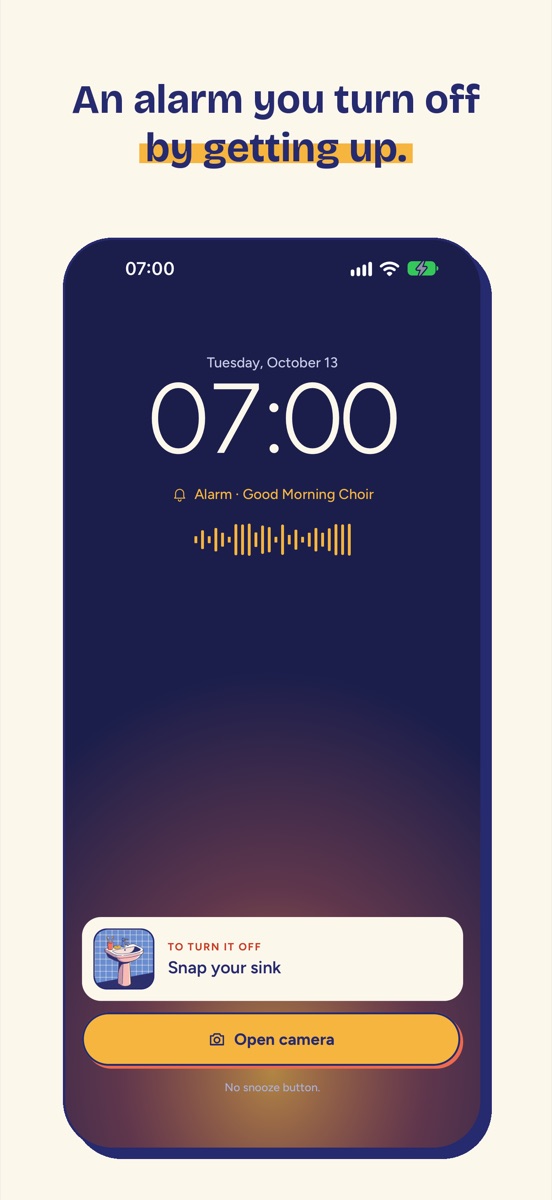
Drawbacks: Daylino is not out yet (it is coming soon to the App Store), it needs iOS 26 or later, and there is no free version. The check recognizes the object in your photo, not where it is, so keeping your spot away from bed is up to you. See how Daylino works.
Which should you pick?
- You like Wayk's missions and want them cheaper, with less data collected: Wakebit.
- You want a workout to be the off switch: Unsnoozable, or Wayk's pushup mission. More ideas in how to wake up early to work out.
- You want lots of missions and sleep sounds: Alarmy.
- You want to pay nothing: Clock with Snooze off, and the phone across the room.
- You want the alarm to lead into the morning you planned: Daylino, when it lands.
FAQ
What is the Wayk app?
An iPhone mission alarm from Dialed Labs Inc. It only stops when you finish a task like pushups, a sky photo or making your bed, and it tracks streaks and morning insights.
Is the Wayk app free?
It is free to download, but its App Store page says a Wayk Pro subscription is required to set alarms and use missions. Plans are listed at $6.99 weekly, $9.99 monthly, and several yearly prices from $19.99 to $59.99 (checked 11 Nov 2026).
How do I cancel Wayk?
On iPhone, open Settings, tap your name, tap Subscriptions, choose Wayk, then tap Cancel Subscription.
Is there a free app like Wayk?
Apple's Clock is free but has no missions. If you want a free mission-style alarm, our best alarm app for heavy sleepers guide lists free options, including NFC alarms like those in our NFC alarm clock guide.
How is Daylino different from Wayk?
Wayk's alarm stops when the mission is done, and the streak records the morning. Daylino's off switch is a photo of a spot away from bed, and a second snap marks the start of your morning goal. Daylino is not out yet. For more on photo alarms, see alarm that makes you take a picture.
Start tomorrow
Whatever you choose, put the off switch somewhere you have to walk to, and set one alarm instead of five. If you'd like that alarm to lead into the thing you got up for, take a look at Daylino, coming soon to the App Store.