
Guides
Alarmy Alternative (2026): 7 iPhone Alarms Compared by What You Need
Quick answer
The best Alarmy alternative depends on why you are leaving. SuperAlarm is the closest match, Apple Clock and Alarmageddon are free, WakeUpBroo and Opto Wake put the off switch away from bed, Sleep Cycle covers sleep tracking, and Daylino (coming soon) adds a second snap that starts your morning goal. Prices checked 11 Nov 2026.
TL;DR: The right Alarmy alternative depends on why you are leaving. For the same missions, try SuperAlarm. To pay nothing, use Apple Clock or Alarmageddon. To put the off switch away from bed, WakeUpBroo or Opto Wake. For sleep tracking without missions, Sleep Cycle. If you want to get up and then start a morning goal, Daylino, the alarm we make, is coming soon. Prices and features checked 11 Nov 2026.
Alarmy is a well-known mission alarm: it keeps ringing until you solve math, play a memory game, shake the phone, do squats or take a photo. People look for an Alarmy alternative for different reasons, so this guide sorts the options by the job you want done instead of crowning one winner.
Why people look for an Alarmy alternative
From Alarmy's own App Store listing and help center, read on 11 Nov 2026:
- The price. Alarmy is free to download, but Wake Up Check, Alarm Sound Power-Up and some missions need Premium. Its in-app purchases run from $4.99 to $69.99. Our is Alarmy free guide lists every one and how to cancel.
- Many missions can be done in bed. Math, memory games and shaking wake up your brain while your legs stay under the blanket.
- It does a lot. Missions, a snore and sleep tracker, sleep sounds and bedtime alarms in one app.
- Privacy. Its App Store privacy label lists location, identifiers and usage data as "Data Used to Track You".
- A feature went away on iPhone. From version 26.41.0, Prevent Power Off is no longer available on iOS, "due to iOS platform requirements" (Alarmy help).
If none of these bother you, Alarmy may still be the right app. It has the widest mission menu here, and its free version covers the basics.
Alarmy alternatives compared
How we compared: each app's own App Store listing and website, fetched 11 Nov 2026 on the US store. We did not install or test these apps, so features are as each developer describes them. "Tracking" is what the App Store privacy label lists under "Data Used to Track You".
| App | Prices checked 11 Nov 2026 | Needs | How you turn it off | Tracking on label |
|---|---|---|---|---|
| SuperAlarm | Free; weekly $4.49 to $4.99, monthly $9.99, yearly $29.99 to $49.99, lifetime $34.99 or $69.99 | iOS 17 | Math, memory, barcode, object, Face ID, walking | Location, identifiers, usage data |
| Apple Clock | Free, built in | Any iPhone | Stop button | None listed |
| Alarmageddon | Free, no in-app purchases | iOS 26 | Math, memory, shake, QR, barcode | None listed |
| WakeUpBroo | Free download; Pro listed at $1.49 and $9.99 | iOS 15.1 | Code from a computer, a saved item's barcode, or 3 words | None listed |
| Opto Wake | Free, no in-app purchases | iOS 26.1, an NFC sticker | Tap an NFC tag | Data not collected |
| Sleep Cycle | Free; Premium listed from $1.99 to $69.99 | iOS 16.2 | Smart Alarm, no missions | Identifiers |
| Daylino | Not out yet; no free version | iOS 26 | Fresh photo of a spot away from bed | Not on the App Store yet |
The options, by job
SuperAlarm: best if you want Alarmy's missions somewhere else
SuperAlarm's listing reads a lot like Alarmy's: math, memory games, barcode scanning, object scanning, Face ID and walking missions, a wake-up check for heavy sleepers, widgets and an Apple Watch app. Unlike Alarmy's listing, it shows lifetime purchases ($34.99 and $69.99) next to its subscriptions.
Drawback: it is a near copy of the same idea, with the same tracking categories on its privacy label and many plans to compare. If Alarmy's missions did not get you out of bed, these may not either.
Apple Clock: best free option you already have
Clock is free, and you can turn Snooze off for each alarm. Apple says alarms still sound in Silent mode and with Do Not Disturb or another Focus on (Apple Support). Charge the phone across the room and you have the oldest trick there is.
Drawback: nothing checks that you got up. Stop is one tap, and you can walk back to bed with the phone. Our no snooze alarm clock guide covers the setups that help.
Alarmageddon: best free mission alarm
Its listing offers math, memory, shake, QR code and barcode challenges, chained tasks (version 1.1.0), a sunrise alarm and an app blocker after you dismiss. It has no in-app purchases.
Drawback: it is new (October 2026) and needs iOS 26 or later. Math, memory and shake can still be done in bed; only the codes need you to walk.
WakeUpBroo: best if you want the off switch on another device
WakeUpBroo has no snooze and no dismiss button. In its default Hard mode you type a code that changes every 5 minutes, shown at wakeupbroo.com/code on your computer. Medium mode names one of 3 to 8 items you saved around your home and only that item's barcode stops it. Easy mode asks you to remember 3 words. Its site says the app has "no accounts, no analytics, no ads" (wakeupbroo.com).
Drawback: setting alarms needs Pro after a 3-day trial (listed at $1.49 and $9.99; its site says monthly or yearly), and Hard mode needs a computer or tablet.
Opto Wake: best free way to tap something away from bed
Opto Wake turns off only when you tap an NFC sticker you placed elsewhere, such as the bathroom mirror. The listing says stopping it from the Lock Screen does not count, it is built on Apple's AlarmKit so it rings in Silent mode and through Focus, and it has "no subscriptions or in-app purchases".
Drawback: you buy NTAG213, 215 or 216 stickers yourself, it needs iOS 26.1 or later, and its lost-tag Emergency Release works three times, ever. See our NFC alarm clock guide.
Sleep Cycle: best if you used Alarmy mainly for sleep tracking
If the snore tracker and sleep report were what you liked, Sleep Cycle is built around them. Its listing describes sound-based sleep tracking, snore and cough detection, and a Smart Alarm that wakes you during your lightest sleep phase.
Drawback: there are no missions, so nothing stops you switching it off and going back to sleep, and Premium has many listed prices.
Daylino: best if you want to get up and start your morning goal
We make Daylino. It is an iPhone alarm with one job: getting you out of bed and into the morning you planned.
- It rings, with no snooze button. Daylino uses Apple's AlarmKit, so it rings through silent mode and Focus.
- You snap a spot away from your bed. Pick one or more, like the bathroom sink, toothbrush, kettle or coffee machine, a glass of water or the inside of the fridge. A fresh photo stops the sound. With two or more spots, it picks a different one each morning.
- Then you show your morning has started. Within two hours, snap the first minute of your goal: an open book, shoes on, a mat rolled out. Meditation uses five minutes with the phone face-down instead.
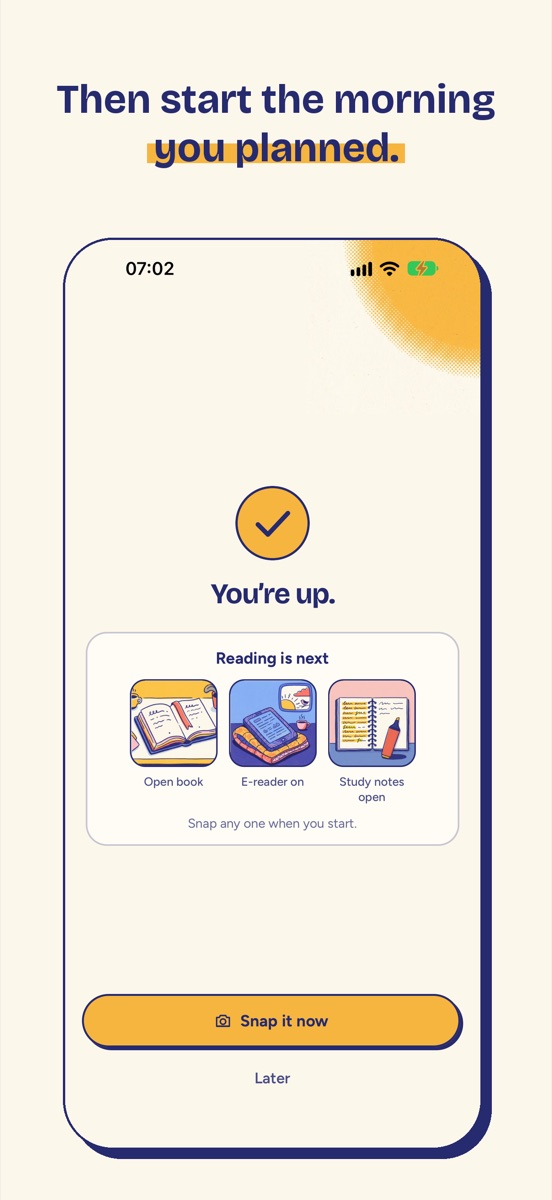
If you silence it with the side button, it rings again a minute later, for up to 15 minutes. If you really cannot snap your spot, you can snap another of your spots or hold for 30 seconds, and the morning is logged as "Turned off by hand". There is no account, and snaps are checked on your phone and kept only there; when the phone is not sure and you are online, a small copy is checked online and not kept.
Drawbacks: it is not on the App Store yet, it needs iOS 26 or later, and there is no free version. It checks what is in the photo, not where it is, so keeping your spot away from bed is up to you. It also has no math, sleep tracking or sleep sounds: if you want those, stay with Alarmy or pick SuperAlarm or Sleep Cycle. More in how Daylino works and alarm that makes you take a picture.
Which Alarmy alternative should you pick?
- You liked the missions and want a lifetime option: SuperAlarm.
- You want to spend nothing: Clock with Snooze off, or Alarmageddon for missions.
- You stop alarms from bed half asleep: an off switch you have to walk to, such as WakeUpBroo, Opto Wake or, when it launches, Daylino.
- You stayed for the sleep report: Sleep Cycle.
- You get up but never reach what you planned: Daylino's second snap is built for that gap.
For more side-by-sides, see best alarm app for heavy sleepers and alarm apps that make you get out of bed.
Before you switch
- Cancel Alarmy Premium first if you have it: Settings, your name, Subscriptions, Alarmy, Cancel Subscription (Apple Support).
- Pick a spot outside your bedroom for whatever you tap, scan or snap. The bathroom sink or the kettle works better than the nightstand.
- Set one alarm for the latest time that works. A string of early alarms teaches you to ignore them. More in how to stop snoozing your alarm.
- Test it while you are awake, so the first real morning holds no surprises.
FAQ
What is the best alternative to Alarmy?
It depends on the job. SuperAlarm is the closest match, Clock and Alarmageddon are free, WakeUpBroo and Opto Wake put the off switch away from bed, and Sleep Cycle covers sleep tracking. Daylino, coming soon, adds a second snap that starts your morning goal.
Is there a free Alarmy alternative?
Yes. Apple Clock is built in, and Alarmageddon and Opto Wake are free with no in-app purchases (checked 11 Nov 2026).
Is there an Alarmy alternative with a one-time price?
SuperAlarm lists lifetime purchases at $34.99 and $69.99. Tagle Alarm, an NFC alarm, is $4.99 once.
Is Daylino free?
No. There is no free version. It is for iPhone with iOS 26 or later and is coming soon to the App Store.
Start with the reason you are leaving
Name the one thing Alarmy did not fix for you, then pick the app built for that job. If it is getting up and actually starting your morning, see how Daylino works, coming soon to the App Store.