
Guides
Is Alarmy Free? What You Get Free, What Premium Costs, and How to Cancel (2026)
Quick answer
Yes. Alarmy is free to download, and its alarm clock, sleep tracker and sleep sounds are free. Premium is a monthly or yearly subscription, after a one-time 7-day free trial, that adds Wake Up Check, Alarm Sound Power-Up and extra missions. Its App Store purchases run from $4.99 to $69.99 (checked 11 Nov 2026).
TL;DR: Yes. Alarmy is free to download, and its App Store listing says the alarm clock, sleep tracker and sleep sounds are free. Premium, a monthly or yearly subscription after a one-time 7-day free trial, adds Wake Up Check, Alarm Sound Power-Up, unlimited snore playback and extra missions. Its in-app purchases run from $4.99 to $69.99 (checked 11 Nov 2026). Free alternatives are below, plus Daylino, the alarm we make (coming soon).
The honest answer is "free, with limits". Below: what the free version does, what Premium adds, every price on the US App Store today, how the trial and cancelling work, what changed this month, and what to use if you would rather not subscribe.
What free Alarmy includes
Alarmy by Delight Room is a free download for iPhone with iOS 17 or later. Its App Store listing calls it "officially a free alarm clock & sleep app" and names the free features as "alarm clock, sleep tracker, sleep sounds etc." Alarmy's own site agrees: you can "access Alarmy's essential features for free" (alar.my).
On the free version you get:
- Alarms with wake-up missions. The listing names math problems, memory games and shaking, plus a Photo Mission, where you photograph an object you registered in advance.
- A sleep tracker with snore detection, and a report each morning.
- Sleep sounds, such as rain, white noise and calm ASMR, with bedtime reminders.
Not every mission is free. Some are Premium, as the next section shows.
What Alarmy Premium adds
Alarmy's help center describes Premium as a subscription "on a monthly or yearly basis" (What is Alarmy Pro or subscription?). Its feature list (Alarmy Premium features) includes:
- Wake Up Check: if you are not awake after the alarm, it rings again.
- Alarm Power-up: an Extra Loud Effect if you do not respond for 40 seconds, and a Label Reminder that reads your alarm label aloud every minute.
- Premium missions: Multiple Mission (up to 5 missions in a row), Walking and Squat.
- Unlimited snore playback from the sleep tracker.
- Ad removal, and a lock that stops you editing an alarm shortly before it rings.
Those two pages sit in Alarmy's Android help center, the edition Google shows for this question. The iOS help center confirms the parts that matter on iPhone: when Premium ends, Premium missions go back to no mission and "Sound Power Pack & Wake Up Check" turn off, while your alarms stay (Alarmy iOS help).
How much is Alarmy Premium?
These are the in-app purchases on Alarmy's US App Store listing. Apple shows up to ten per app and does not label the billing period, so we list names and prices only and do not guess which is monthly or yearly. The app shows the plan length and your price before you confirm.
| In-app purchase (as listed) | Prices checked 11 Nov 2026 |
|---|---|
| Alarmy Premium Basic | $4.99 and $7.49 |
| Alarmy Premium Light | $4.99 |
| Alarmy Premium Standard | $7.49 and $59.99 |
| Alarmy Premium (Promotion) | $7.49 |
| Alarmy Premium Plus | $59.99 |
| Alarmy Pro | $8.99 and $69.99 |
Which one you are offered depends on the plan and any promotion in the app.
The 7-day free trial
- One time only. Alarmy offers "the one-time 7-day free trial" with all Premium features (Alarmy iOS help).
- It becomes a subscription. "After the free-trial period, the premium subscription will automatically start."
- Cancelling early does not cut it short. If you cancel during the trial, no subscription starts, and the trial still runs to its end (Alarmy iOS help).
How to cancel Alarmy Premium on iPhone
Alarmy's help center sends iPhone users to Apple, because the App Store runs the subscription (Alarmy iOS help). Apple's steps (Cancel a subscription from Apple):
- Open Settings and tap your name.
- Tap Subscriptions.
- Tap Alarmy.
- Tap Cancel Subscription. You may need to scroll. If there is no Cancel button, or you see an expiration message in red, it is already cancelled.
Alarmy's listing says a subscription renews unless you cancel at least 24 hours before the period ends.
Refunds. Alarmy says it cannot issue refunds on iOS, so you ask Apple (Alarmy iOS help). Sign in at reportaproblem.apple.com, choose "Request a refund", pick a reason and the purchase. Apple says to expect an update within 24 to 48 hours (Apple Support).
Switching between monthly and yearly. Within 7 days of your first payment, Alarmy suggests cancelling, asking Apple for a refund and buying the other plan. After 7 days, wait for the current plan to end (Alarmy iOS help).
What changed in Alarmy this month
From Alarmy's iOS help center and its App Store release notes, all read on 11 Nov 2026:
- Prevent Power Off is gone on iPhone. From version 26.41.0, Alarmy says it can no longer support the feature "due to iOS platform requirements" (notice).
- Multiple missions in one alarm. Version 26.42.0 (2 Nov 2026) lets you combine missions in a single alarm.
- Emergency Escape. If you really cannot do a mission, you tap Emergency Escape 10 times and fill in a pledge form that grows the more you use it (resets monthly) (Alarmy iOS help).
- Updates need iOS 17. From version 26.33.0, phones on iOS 16 or earlier keep the version they have but get no updates (notice).
Is Alarmy Premium worth paying for?
- Stay free if a sound and a math or memory mission get you up. Most of the app works without paying.
- Premium makes sense if you switch the alarm off and fall back asleep, since Wake Up Check rings again, or if you want the Squat and Walking missions.
- Look elsewhere if you stop alarms from bed (math, memory and shake missions can be finished lying down), or if tracking matters to you: Alarmy's privacy label lists location, identifiers and usage data as "Data Used to Track You".
More on the habit itself in how to stop snoozing your alarm, and on in-bed missions in math alarm clock.
Free and cheaper alternatives to Alarmy, by job
How we compared: each app's own App Store listing and website, fetched 11 Nov 2026 on the US store. We did not install or test these apps, so features are as each developer describes them.
| App | Prices checked 11 Nov 2026 | Needs | Best for |
|---|---|---|---|
| Apple Clock | Free, built in | Any iPhone | A plain alarm with no subscription |
| Alarmageddon | Free, no in-app purchases | iOS 26 or later | Free missions with no subscription |
| Opto Wake | Free, no in-app purchases | iOS 26.1 or later, an NFC sticker | A free tag you tap away from bed |
| Tagle Alarm | $4.99, paid once | iOS 26.4 or later, an NFC sticker | Paying once |
| SuperAlarm | Free; lifetime listed at $34.99 and $69.99 | iOS 17 or later | The closest match to Alarmy |
| Daylino | Not out yet; no free version | iOS 26 or later | Getting up, then starting your goal |
Apple Clock: best free option you already have
Clock is free and lets you turn Snooze off for each alarm. Apple says alarms still sound in Silent mode and with Do Not Disturb or another Focus on (Apple Support). Drawback: nothing makes you get up; Stop is one tap away from bed. See no snooze alarm clock for setups that help.
Alarmageddon: best free mission alarm
Math, memory, shake, QR code and barcode challenges, chained tasks and an app blocker, with no in-app purchases. Drawback: it is new (version 1.1.0, October 2026) and needs iOS 26 or later, and math, memory and shake can still be done in bed.
Opto Wake: best free option if you will stick a tag up
Free with "no subscriptions or in-app purchases" and a "Data Not Collected" label. You tap an NFC sticker you placed away from bed, and stopping from the Lock Screen does not count. Drawback: you buy the stickers yourself, it needs iOS 26.1 or later, and Emergency Release works three times, ever. More in our NFC alarm clock guide.
Tagle Alarm: best if you would rather pay once
$4.99 once, no subscription, with a backup alarm and gradual volume. Drawback: it needs iOS 26.4 or later and an NTAG213 sticker.
SuperAlarm: the closest match to Alarmy
Math, memory, barcode, object scanning, Face ID and walking missions, a wake-up check and Apple Watch support. Drawback: many plans to compare, and the same tracking categories as Alarmy on its privacy label.
Daylino: best if you want to get up and start your goal
We make Daylino, an iPhone alarm with no snooze button. It rings through silent mode and Focus and stops when you take a fresh photo of the spot you chose away from your bed, such as the bathroom sink or the kettle. Stop it any other way and it rings again a minute later, for up to 15 minutes. Then a second snap shows your morning goal has started, like an open book or shoes on.
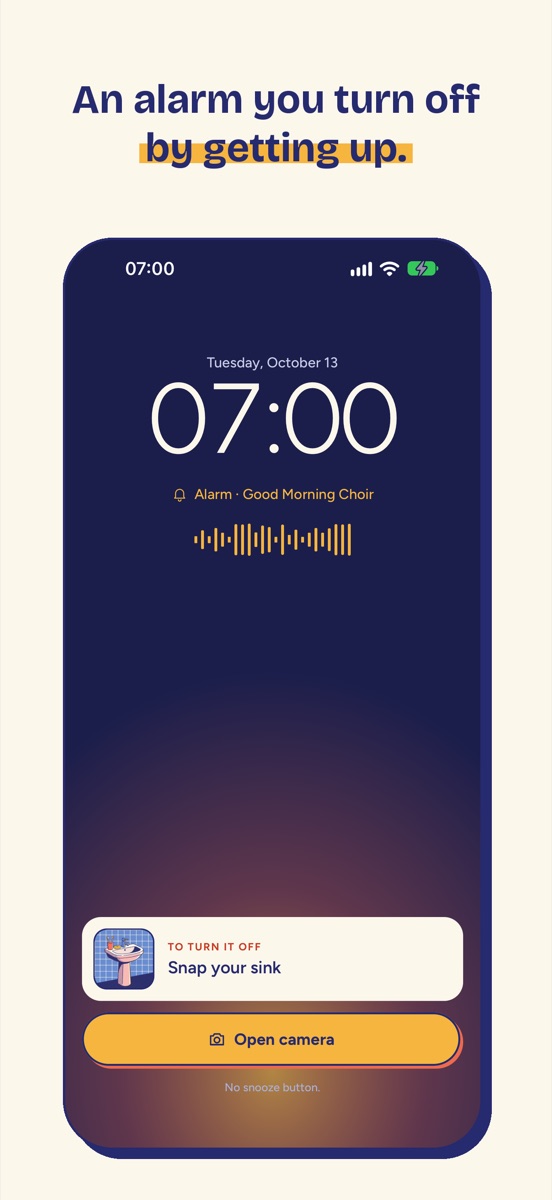
Drawbacks: it is not out yet, it needs iOS 26 or later, and there is no free version. It checks what is in the photo, not where it is, so keeping the spot away from bed is up to you. See how Daylino works and our Alarmy alternative comparison.
FAQ
Does free Alarmy have ads?
Alarmy's help center lists ad removal as a Premium feature, and says the Pro and Remove Ads versions show no ads at all. Expect ads on the free version.
What happens to my alarms when Premium ends?
They stay. Alarms that used Premium missions switch to no mission, and Sound Power Pack and Wake Up Check turn off.
How do I cancel the Alarmy free trial?
Settings, your name, Subscriptions, Alarmy, Cancel Subscription. The trial keeps running to day 7 and no payment starts.
Is Daylino free?
No. There is no free version, and it is coming soon to the App Store for iPhone with iOS 26 or later.
The short version
Alarmy is free and usable without paying; Premium ($4.99 to $69.99 today) adds the features that bring the alarm back after you switch it off. If what you need is an alarm you cannot stop from bed, compare the options in best alarm app for heavy sleepers, or see how Daylino works, coming soon to the App Store.